RTC实验
RTC简介
I.MX6U 内部也有个RTC模块,但是不叫作RTC,而是叫做SNVS。
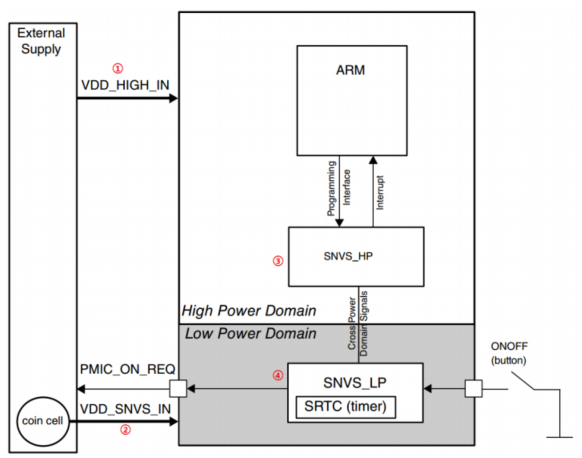
VDD_HIGH_IN 是系统(芯片)主电源,这个电源会同时供给给 SNVS_HP 和 SNVS_LP。
VDD_SNVS_IN 是纽扣电池供电的电源,这个电源只会供给给 SNVS_LP,保证在系统主电源 VDD_HIGH_IN 掉电以后 SNVS_LP 会继续运行。
SNVS_HP 部分。
SNVS_LP 部分,此部分有个 SRTC,这个就是我们本章要使用的 RTC。
其实不管是 SNVS_HP 还是 SNVS_LP,其内部都有一个 SRTC,但是因为 SNVS_HP 在系统电源掉电以后就会关闭,所以我们本章使用的是 SNVS_LP 内部的 SRTC。
RTC相关寄存器
SNVS_HPCOMR
NPSWA_EN(bit31),这个位是非特权软件访问控制位,如果非特权软件要访问 SNVS 的话此位必须为 1。
SNVS_LPCR
SRTC_ENV(bit0) 此位为 1 的话就使能 STC 计数器
SNVS_SRTCMR 和 SNVS_SRTCLR
这两个寄存器保存着 RTC 的秒数,
例如设置RTC时间的初始值得时候
	SNVS->LPSRTCMR = (unsigned int)(seconds >> 17); /* 设置高16位 */
	SNVS->LPSRTCLR = (unsigned int)(seconds << 15); /* 设置地16位 */
例如要读取RTC当前的秒数
seconds = (SNVS->LPSRTCMR << 17) | (SNVS->LPSRTCLR >> 15);
代码分析
参见【18.rtc】工程
由于官方SDK是IMX6ULL写的,因此文件 MCIMX6Y2.h中的结构体 SNVS_Type 里面的寄存器是不全的,我们需要在其中加入本章实验所需要的寄存
器,修改 SNVS_Type 为如下所示

bsp_rtc.c文件
/***************************************************************
Copyright © zuozhongkai Co., Ltd. 1998-2019. All rights reserved.
文件名	: 	 bsp_rtc.c
作者	   : 左忠凯
版本	   : V1.0
描述	   : RTC驱动文件。
其他	   : 无
论坛 	   : www.openedv.com
日志	   : 初版V1.0 2019/1/3 左忠凯创建
***************************************************************/
#include "bsp_rtc.h"
#include "stdio.h"

/*
 * 描述:初始化RTC
 */
void rtc_init(void)
{
	/*
     * 设置HPCOMR寄存器
     * bit[31] 1 : 允许访问SNVS寄存器,一定要置1
     * bit[8]  1 : 此位置1,需要签署NDA协议才能看到此位的详细说明,
     *             这里不置1也没问题
	 */
	SNVS->HPCOMR |= (1 << 31) | (1 << 8);

#if 0
	struct rtc_datetime rtcdate;

	rtcdate.year = 2018U;
    rtcdate.month = 12U;
    rtcdate.day = 13U;
    rtcdate.hour = 14U;
    rtcdate.minute = 52;
    rtcdate.second = 0;
	rtc_setDatetime(&rtcdate); //初始化时间和日期
#endif

	rtc_enable();	//使能RTC

}

/*
 * 描述: 开启RTC
 */
void rtc_enable(void)
{
	/*
	 * LPCR寄存器bit0置1,使能RTC
 	 */
	SNVS->LPCR |= 1 << 0;
	while(!(SNVS->LPCR & 0X01));//等待使能完成

}

/*
 * 描述: 关闭RTC
 */
void rtc_disable(void)
{
	/*
	 * LPCR寄存器bit0置0,关闭RTC
 	 */
	SNVS->LPCR &= ~(1 << 0);
	while(SNVS->LPCR & 0X01);//等待关闭完成
}

/*
 * @description	: 判断指定年份是否为闰年,闰年条件如下:
 * @param - year: 要判断的年份
 * @return 		: 1 是闰年,0 不是闰年
 */
unsigned char rtc_isleapyear(unsigned short year)
{
	unsigned char value=0;

	if(year % 400 == 0)
		value = 1;
	else
	{
		if((year % 4 == 0) && (year % 100 != 0))
			value = 1;
		else
			value = 0;
	}
	return value;
}

/*
 * @description		: 将时间转换为秒数
 * @param - datetime: 要转换日期和时间。
 * @return 			: 转换后的秒数
 */
unsigned int rtc_coverdate_to_seconds(struct rtc_datetime *datetime)
{
	unsigned short i = 0;
	unsigned int seconds = 0;
	unsigned int days = 0;
	unsigned short monthdays[] = {0U, 0U, 31U, 59U, 90U, 120U, 151U, 181U, 212U, 243U, 273U, 304U, 334U};

	for(i = 1970; i < datetime->year; i++)
	{
		days += DAYS_IN_A_YEAR; 		/* 平年,每年365天 */
		if(rtc_isleapyear(i)) days += 1;/* 闰年多加一天 		*/
	}

	days += monthdays[datetime->month];
	if(rtc_isleapyear(i) && (datetime->month >= 3)) days += 1;/* 闰年,并且当前月份大于等于3月的话加一天 */

	days += datetime->day - 1;

	seconds = days * SECONDS_IN_A_DAY +
				datetime->hour * SECONDS_IN_A_HOUR +
				datetime->minute * SECONDS_IN_A_MINUTE +
				datetime->second;

	return seconds;
}

/*
 * @description		: 设置时间和日期
 * @param - datetime: 要设置的日期和时间
 * @return 			: 无
 */
void rtc_setdatetime(struct rtc_datetime *datetime)
{

	unsigned int seconds = 0;
	unsigned int tmp = SNVS->LPCR;

	rtc_disable();	/* 设置寄存器HPRTCMR和HPRTCLR的时候一定要先关闭RTC */


	/* 先将时间转换为秒         */
	seconds = rtc_coverdate_to_seconds(datetime);

	SNVS->LPSRTCMR = (unsigned int)(seconds >> 17); /* 设置高16位 */
	SNVS->LPSRTCLR = (unsigned int)(seconds << 15); /* 设置地16位 */

	/* 如果此前RTC是打开的在设置完RTC时间以后需要重新打开RTC */
	if (tmp & 0x1)
		rtc_enable();
}

/*
 * @description		: 将秒数转换为时间
 * @param - seconds	: 要转换的秒数
 * @param - datetime: 转换后的日期和时间
 * @return 			: 无
 */
void rtc_convertseconds_to_datetime(unsigned int seconds, struct rtc_datetime *datetime)
{
    unsigned int x;
    unsigned int  secondsRemaining, days;
    unsigned short daysInYear;

    /* 每个月的天数       */
    unsigned char daysPerMonth[] = {0U, 31U, 28U, 31U, 30U, 31U, 30U, 31U, 31U, 30U, 31U, 30U, 31U};

    secondsRemaining = seconds; /* 剩余秒数初始化 */
    days = secondsRemaining / SECONDS_IN_A_DAY + 1; 		/* 根据秒数计算天数,加1是当前天数 */
    secondsRemaining = secondsRemaining % SECONDS_IN_A_DAY; /*计算天数以后剩余的秒数 */

	/* 计算时、分、秒 */
    datetime->hour = secondsRemaining / SECONDS_IN_A_HOUR;
    secondsRemaining = secondsRemaining % SECONDS_IN_A_HOUR;
    datetime->minute = secondsRemaining / 60;
    datetime->second = secondsRemaining % SECONDS_IN_A_MINUTE;

    /* 计算年 */
    daysInYear = DAYS_IN_A_YEAR;
    datetime->year = YEAR_RANGE_START;
    while(days > daysInYear)
    {
        /* 根据天数计算年 */
        days -= daysInYear;
        datetime->year++;

        /* 处理闰年 */
        if (!rtc_isleapyear(datetime->year))
            daysInYear = DAYS_IN_A_YEAR;
        else	/*闰年,天数加一 */
            daysInYear = DAYS_IN_A_YEAR + 1;
    }
	/*根据剩余的天数计算月份 */
    if(rtc_isleapyear(datetime->year)) /* 如果是闰年的话2月加一天 */
        daysPerMonth[2] = 29;

    for(x = 1; x <= 12; x++)
    {
        if (days <= daysPerMonth[x])
        {
            datetime->month = x;
            break;
        }
        else
        {
            days -= daysPerMonth[x];
        }
    }

    datetime->day = days;

}

/*
 * @description	: 获取RTC当前秒数
 * @param 		: 无
 * @return 		: 当前秒数
 */
unsigned int rtc_getseconds(void)
{
	unsigned int seconds = 0;

	seconds = (SNVS->LPSRTCMR << 17) | (SNVS->LPSRTCLR >> 15);
	return seconds;
}

/*
 * @description		: 获取当前时间
 * @param - datetime: 获取到的时间,日期等参数
 * @return 			: 无
 */
void rtc_getdatetime(struct rtc_datetime *datetime)
{
	unsigned int seconds = 0;
	seconds = rtc_getseconds();
	rtc_convertseconds_to_datetime(seconds, datetime);
}
main.c
int main(void)
{

	char buf[160];
	struct rtc_datetime rtcdate;

	int_init(); 		/* 初始化中断(一定要最先调用!) */
	imx6u_clkinit();

	rgb_led_init();		/* 初始化led 			*/
	uart_init();		/* 初始化串口,波特率115200 */
  	beep_init();
	key_init();

    gpt2_base_timer_init(); // 精准delay延时用

    printf("LCD Demo  c=%d\r\n",c);

 	lcd_init();					/* 初始化LCD 			*/
	rtc_init(); 				/* 初始化RTC	 		*/


	memset(buf, 0, sizeof(buf));


	tftlcd_dev.forecolor = LCD_RED;
	lcd_fill(50, 90, 370, 110, tftlcd_dev.backcolor); /* 清屏 */
	lcd_show_string(50, 90, 200, 16, 16, (char*)"Current Time:");  			/* 显示字符串 */
	tftlcd_dev.forecolor = LCD_BLUE;

	while(1)
	{
		if(KEY_READ()==1)
		{
			delay_ms(50);
			if(KEY_READ()==1){
				rtcdate.year  = 2018;
				rtcdate.month = 1;
				rtcdate.day   = 15;
				rtcdate.hour  = 16;
				rtcdate.minute = 23;
				rtcdate.second = 0;
				rtc_setdatetime(&rtcdate); /* 初始化时间和日期 */
				printf("\r\n RTC set time \r\n");

			}

		}

		rtc_getdatetime(&rtcdate);
		sprintf(buf,"%d/%d/%d %d:%d:%d",rtcdate.year, rtcdate.month, rtcdate.day, rtcdate.hour, rtcdate.minute, rtcdate.second);
		lcd_fill(50,110, 300,130, tftlcd_dev.backcolor);
		lcd_show_string(50, 110, 250, 16, 16,(char*)buf);  /* 显示字符串 */

		delay_ms(1000);	/* 延时一秒 */
	}
	return 0;
}
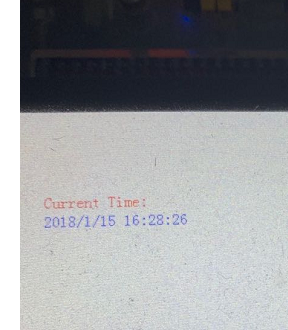
实验现象
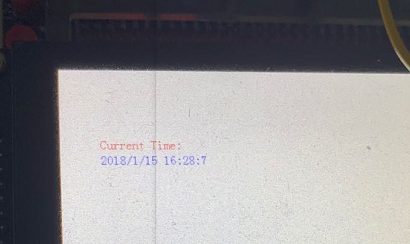
断电过些时间在启动板子,发现时间是没有停止的